# Manage a member's plans and credits
Grant or remove a member's plan and read their credit history.
Source: https://docs.champagne.dev-ukab.fr/en/guide/staff/member-plans-and-credits
The **Memberships** and **Credits** cards, in the **Membership** tab of a profile, show what a member pays for and what they
spend. This page shows how to grant a [plan](/en/guide#plan) by hand, remove one and read every credit movement.
To open a profile, see [Work on a member's profile](/en/guide/staff/member-profile).
## 1. Grant or remove a plan [#1-grant-or-remove-a-plan]
The **Memberships** card lists the person's plans. Each plan shows **Valid membership** or
**Expired membership**, whether it is a **Subscription** or an **Add-on**, whether it is
**Paid** or **Unpaid** when the payment is known, and its end date, or **No end date**.
### Grant a plan [#grant-a-plan]
Use this to give a plan by hand, for example a free season pass.
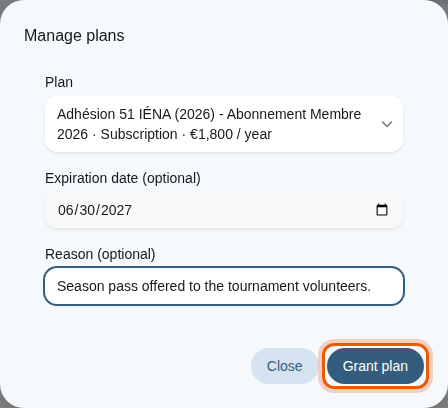
1. Select **Manage plans**.
2. Choose the **Plan**.
3. Optionally, set an **Expiration date (optional)**. Leave it empty for a plan with no end
date.
4. Optionally, add a **Reason (optional)** for the history.
5. Select **Grant plan**.
Granting an example season pass to Alex Morgan until the end of June 2027. The control to use is
outlined in orange.
A granted plan does not create an invoice. If the person already has the same plan granted by
hand, Champagne updates its expiration date.
### Remove a plan [#remove-a-plan]
Select **Remove membership** on a plan, add a **Reason (optional)** and confirm with **Remove
membership**. A plan granted by hand disappears immediately. A plan paid through Stripe may come
back when Stripe sends its next update: to stop a paid subscription, cancel it in your payment
account.
Open **Technical details** on a plan to see its **Stripe price** and its **Membership ID**, for
example when your Champagne provider asks for them.
Each plan added, renewed or removed is kept in the **Membership history** of the profile. See
[Read the history and signed
documents](/en/guide/staff/member-profile#4-read-the-history-and-signed-documents).
## 2. Read the credit history [#2-read-the-credit-history]
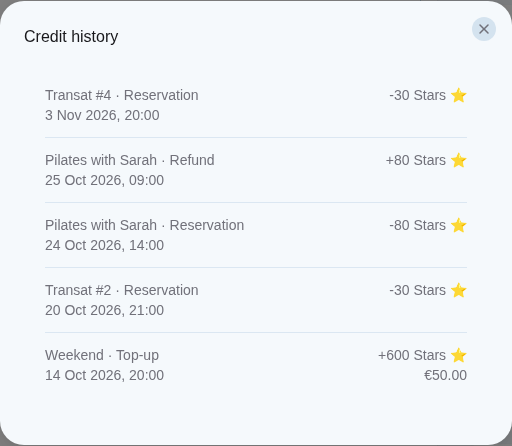
Select **View history** in the **Credits** card to open **Credit history**. Each line shows what
the [credits](/en/guide#credits) were used for, such as a **Top-up**, a **Reservation**, a **Security deposit**, a
**Refund**, a **Deposit returned** or an **Add-on**, with its date and the number of credits
added or spent. For a top-up, the amount the member paid appears under the credits.
The credit history of the example member Alex Morgan.