# Blocked periods, sessions and waitlists
Close a resource for a while, find the sessions of a group class and check the waitlist.
Source: https://docs.champagne.dev-ukab.fr/en/guide/staff/blocked-periods-and-waitlists
The buttons at the top right of the calendar in **Reservations** close a resource for a while,
list the sessions of a group class and show who is waiting for a place. The buttons you see
depend on the category and on your [role](/en/guide#role). To read the calendar, see [Handle
reservations](/en/guide/staff/reservations).
## 1. Block a period [#1-block-a-period]
A blocked period closes a resource for a while, for example during maintenance. Nobody can
book it.
**Block periods** opens **Manage blocked periods**. Choose what it **Applies to**: **All
resources** or one of them. Enter the start and end, the **Reason (optional)**, then select
**Block period**. The period appears in red in the calendar.
You can also open the **Blocked period** tab at the top of the **Add reservation** form. Fill
in the dates and an optional reason, then select **Block period**. This tab is only shown if
your role lets you change the category.
## 2. Reopen a blocked period [#2-reopen-a-blocked-period]
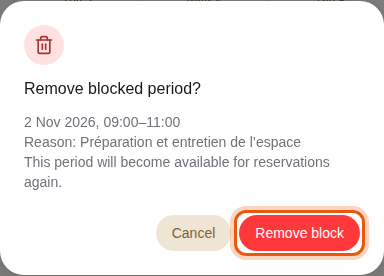
To reopen a blocked period, select its red **Blocked** block in the calendar. The window
shows the dates and the reason. Select **Remove block** to make the period bookable again.
A blocked period of the example meeting room Salle de réunion. The control to use is outlined in
orange.
## 3. Find the sessions of a group class [#3-find-the-sessions-of-a-group-class]
**Manage sessions** replaces **Block periods** in group-class categories. It lists the
**Dated** and **Recurring** sessions members can book, and **Add session** creates one. A
warning icon next to the button means the category has no sessions yet. Your administrator
usually sets the sessions up. See [Sessions, guest lists and blocked
periods](/en/guide/admins/sessions-and-blocked-periods).
## 4. Check the waitlist [#4-check-the-waitlist]
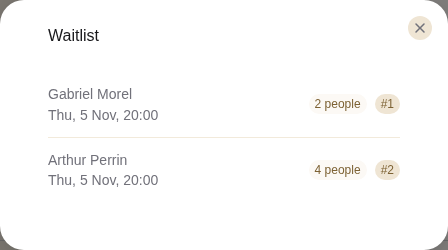
**Waitlist** appears in categories where members pick a time and a number of people. It
lists who is waiting for a place in the next 30 days, with the date and time they want,
the number of people and their position in the queue. When nobody is waiting, it shows
**Nobody is waiting in the next 30 days.**
Two parties waiting for a table at the example restaurant Le Rooftop.
When a place frees up, for example after a cancellation, Champagne books it within a minute for
the people waiting, in queue order, with any payment due. The place does not stay free for
someone at the desk.
For group classes, the waitlist of each session appears in its panel in **Club calendar**. See
[Use the club calendar](/en/guide/staff/planning#2-follow-a-session-and-mark-attendance).